Fast & private payment
Buy IPTV with Cash App
You can pay for any LifetimeIPTV Now plan using Cash App. Cash App doesn’t take IPTV payments directly, so you buy Bitcoin (BTC) inside Cash App — it takes a minute — then pay us with it. Here are your two easy options.
Quick answer
To buy IPTV with Cash App: open Cash App, tap the Bitcoin (₿) icon, and buy Bitcoin equal to your plan price plus an extra $3–$5 for fees. Then either pay at our crypto checkout (choose “Pay with Cryptocurrencies via Plisio” → Bitcoin), or send the Bitcoin to our wallet address bc1qq0k2p8slhsuc4z3p2cw7hr898775wt06afh9mu and message us on WhatsApp. Your IPTV plan is activated once the payment is confirmed, usually within minutes.
How to Pay for IPTV Using Cash App
- Open Cash App and go to the Bitcoin (₿) tab.
- Buy Bitcoin using your Cash App balance or linked debit card.
- Copy the wallet address shown at IPTV checkout (or the BTC address on this page).
- Send the Bitcoin from your Cash App balance to that address, then tell us on WhatsApp.
Our Bitcoin wallet
Send Bitcoin to This Address
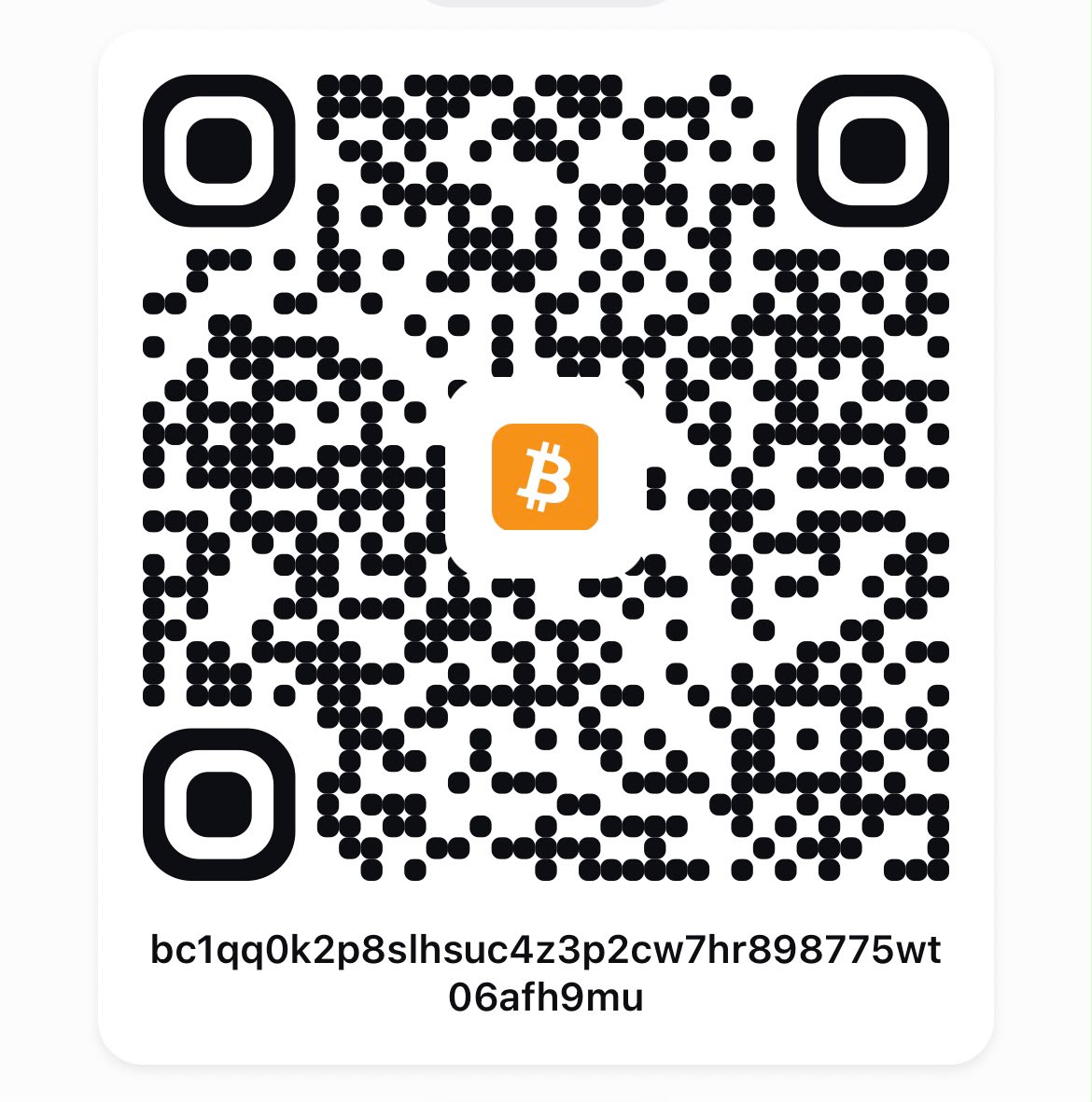
Scan the QR in Cash App, or copy the address below:
bc1qq0k2p8slhsuc4z3p2cw7hr898775wt06afh9mu Double-check the address matches exactly before you send. After payment, let us know on WhatsApp and your plan is activated once the payment confirms — usually within minutes.
Step by step
How to Buy Bitcoin on Cash App
Open Cash App
Open Cash App on your phone and tap the ₿ Bitcoin icon.
Buy Bitcoin
Tap “Buy Bitcoin”, then tap “Buy” again to continue.
Enter the correct amount
Buy Bitcoin equal to your subscription plan price. Add an extra $3–$5 to cover Cash App and Bitcoin network fees.
Return to checkout
Once your Bitcoin purchase is complete, go back to the checkout page.
Pay with Bitcoin
Choose “Pay with Cryptocurrencies via Plisio”, select Bitcoin (BTC), and complete the payment with the Bitcoin you just bought.
Your subscription will be processed after payment confirmation.
Pick Your Plan
Choose a plan, then pay by Bitcoin using either option above. Prices in GBP (£).
1 Month
Try it month to month
£20.00/mo
1 Month IPTV plan details →What’s included
- 35,000+ live TV channels
- 195,000+ movies & series (VOD)
- 4K UHD & Full HD streaming
- All sports, PPV & live events
- EPG + 4-day catch-up
- Works on every device & app
- Anti-freeze, stable servers
- VPN included
- Instant setup via WhatsApp
- 24/7 support
3 Months
Flexible short-term plan
£60.00 SAVE 53%
£9.33/mo · vs £20/mo monthly
3 Months IPTV plan details →What’s included
- 35,000+ live TV channels
- 195,000+ movies & series (VOD)
- 4K UHD & Full HD streaming
- All sports, PPV & live events
- EPG + 4-day catch-up
- Works on every device & app
- Anti-freeze, stable servers
- VPN included
- Instant setup via WhatsApp
- 24/7 support
6 Months
Save more with a longer plan
£120.00 SAVE 71%
£5.83/mo · vs £20/mo monthly
6 Months IPTV plan details →What’s included
- 35,000+ live TV channels
- 195,000+ movies & series (VOD)
- 4K UHD & Full HD streaming
- All sports, PPV & live events
- EPG + 4-day catch-up
- Works on every device & app
- Anti-freeze, stable servers
- VPN included
- Instant setup via WhatsApp
- 24/7 support
12 Months
Most popular choice
£240.00 SAVE 80%
£4.08/mo · vs £20/mo monthly
12 Months IPTV plan details →What’s included
- 35,000+ live TV channels
- 195,000+ movies & series (VOD)
- 4K UHD & Full HD streaming
- All sports, PPV & live events
- EPG + 4-day catch-up
- Works on every device & app
- Anti-freeze, stable servers
- VPN included
- Instant setup via WhatsApp
- 24/7 support
24 Months
Lowest monthly cost
£480.00 SAVE 84%
£3.29/mo · vs £20/mo monthly
24 Months IPTV plan details →What’s included
- 35,000+ live TV channels
- 195,000+ movies & series (VOD)
- 4K UHD & Full HD streaming
- All sports, PPV & live events
- EPG + 4-day catch-up
- Works on every device & app
- Anti-freeze, stable servers
- VPN included
- Instant setup via WhatsApp
- 24/7 support
Lifetime
Pay once, keep forever
One-time payment · lifetime access
Buy Lifetime on WhatsApp Lifetime IPTV plan details →What’s included
- 35,000+ live TV channels
- 195,000+ movies & series (VOD)
- 4K UHD & Full HD streaming
- All sports, PPV & live events
- EPG + 4-day catch-up
- Works on every device & app
- Anti-freeze, stable servers
- VPN included
- Instant setup via WhatsApp
- 24/7 support
Cash App & Bitcoin — Frequently Asked Questions
Can I buy IPTV with Cash App?
Yes. Cash App doesn’t support IPTV directly, but you can buy Bitcoin (BTC) inside Cash App in a minute and pay with it — either at our crypto checkout or by sending BTC to our wallet address.
How much Bitcoin should I buy?
Buy Bitcoin equal to your chosen plan price, plus an extra $3–$5 to cover Cash App and Bitcoin network fees so the full amount arrives.
How do I send the Bitcoin to you?
Copy our BTC address on this page (or scan the QR code), send the amount from Cash App, then message us on WhatsApp so we can confirm and activate your plan.
How long until my plan is active?
Your subscription is processed after the payment is confirmed on the Bitcoin network — usually within minutes. We send your login on WhatsApp.
Is paying with Bitcoin safe?
Yes. Bitcoin payments are secure and private. Just double-check the wallet address matches exactly before you send.